|
<< Click to Display Table of Contents >> Converting a Counter to a Flow Rate |
  
|
|
<< Click to Display Table of Contents >> Converting a Counter to a Flow Rate |
|
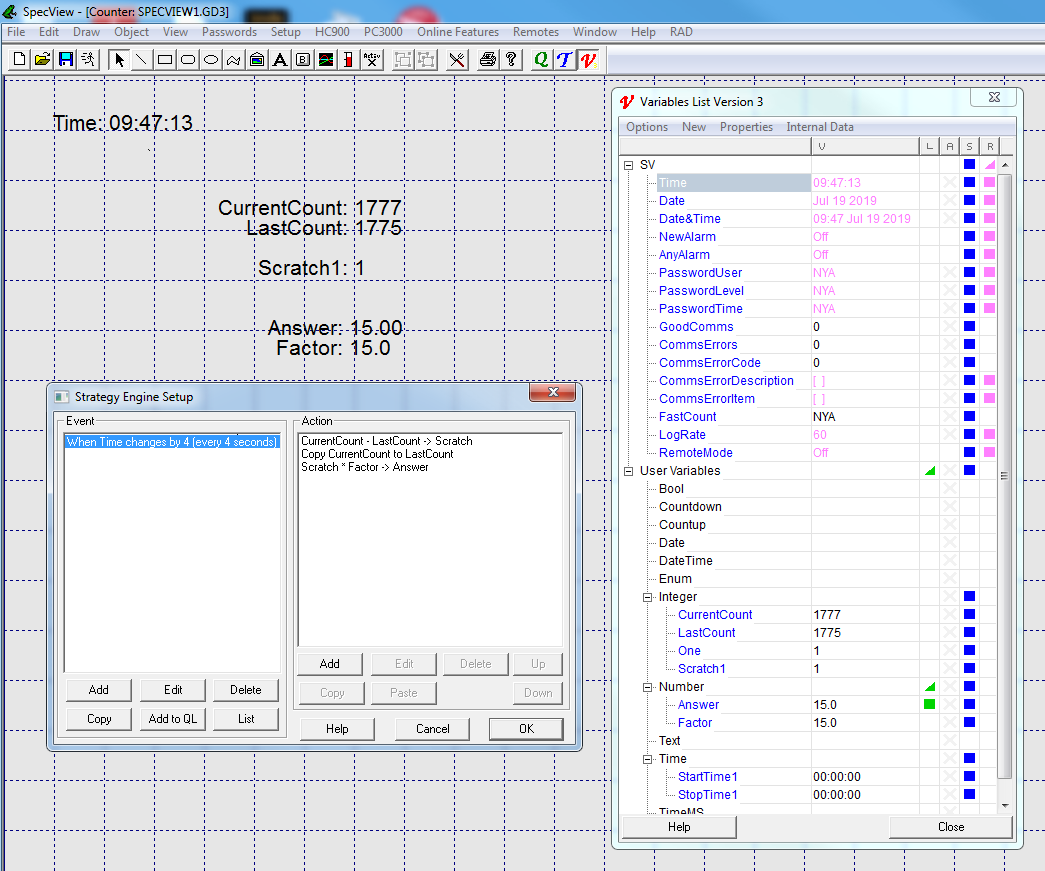
To convert a counter from a Digital Input on an instrument into a flow rate involves some math in Strategy.
The Strategy Event needs to trigger at a time interval as required to calculate the flow rate.
In the example below it is set to trigger every 4 seconds.
This is done by creating a 'Value Based Event' and watching SpecView's Time variable to see when it is 'Changed' by 4 seconds:

In the screenshot below, there are 3 Strategy Actions, which are:
| • | CurrentCount - LastCount -> Scratch |
Calculate the amount that CurrentCount has changed by since the LastCount and save it into a temporary variable.
| • | Copy CurrentCount to LastCount |
Replace LastCount with the CurrentCount.
| • | Scratch + Factor -> Answer |
Factor is the conversion factor (which in the example below is 15) which is used to convert into the flow rate.