|
<< Click to Display Table of Contents >> Runtime |
  
|
|
<< Click to Display Table of Contents >> Runtime |
|
Data entry boxes are now resizeable. Their size and position is remembered, which is particularly helpful when using a Touch Screen, as larger buttons are easier to use.
Since the boxes retain their previous positions, multiple data entry is smoother.
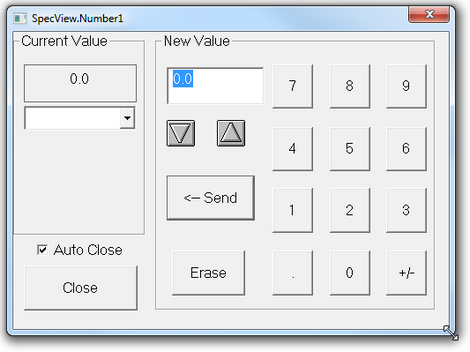
There are new data types - Enum, Countup Timer and High Precision Number.

Variables and parameters can now be made Read-Only from the Variables List to avoid values being inadvertently changed.
Preferences
The Preferences box, which is accessed from the File menu, has some additions that effect Runtime:
| • | Logging tab - DP Override for decimal places |
| • | Language tab - to set the language for SpecView's menus and boxes |
| • | Display tab - Window positions to remember the positions of GDWs and whether to allow minimizing of windows |
Trend Charts
In Runtime Mode the most important features of Trend Charts are:
| ▪ | Scroll back - to view previous data - this is independent of Historical Replay |
| ▪ | Chart Notes - to add notes to the pen traces |
| ▪ | Chart Cursors - to see exact values and times together with the difference in value and the elapsed time |
Quick List
The Quick List is a method of viewing particularly important parameters/variables from ALL instruments and User Variables in the Variables List, such that their values can be easily accessed and modified.