|
<< Click to Display Table of Contents >> ActiveX Variables Methods |
  
|
|
<< Click to Display Table of Contents >> ActiveX Variables Methods |
|
A Method is something that can't be classed as an input or output. For example, something that has no inputs or outputs, such as an 'About...' box.
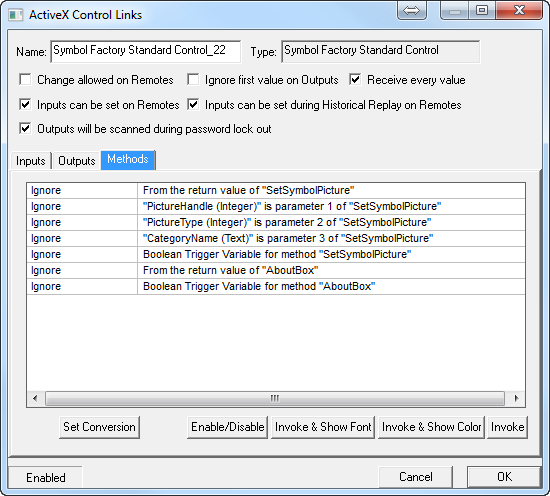
To assign an ActiveX Control's Methods to SpecView variables it is necessary to have first throughly read & understood the Control's documentation supplied by the author of the control.
It is possible to assign one of four kinds of value to a Method:
1. Constant values: To set a parameter to a constant value replace the word 'Ignore' with the value.
2. SpecView variables or Instrument parameters: Click the required parameter on the Methods tab then click the Variables List button:

& select the instrument or SpecView User variable to link it to.
3. Colors: Choose 'Select Color' and select the required color. The color will be shown in notation, for example: 'Color_65280', not as the name of the color, for example: 'Green'.
4. Fonts: Choose 'Select Font' and select the required font. The font will be shown in notation, for example: ' Font_Arial,10,0,400,0', not as the name of the font, for example: 'Arial Regular 10'.
Enable/Disable: This will enable or disable the selected item, or if none are selected then it will enable/disable the entire control.
All controls can be enabled/disabled using the File->Preferences ActiveX tab.
Invoke & Show As Font:
Invoke & Show As Color:
Some ActiveX controls are written such that they have some Outputs & Methods that can be represented as Colors or Fonts. However, please refer to the Control's documentation for further information on this.
Invoke: The Invoke button can be used to run a Method to test it.
See also:
ActiveX - Steps to add an ActiveX Control