The Variables List provides a detailed menu of options:
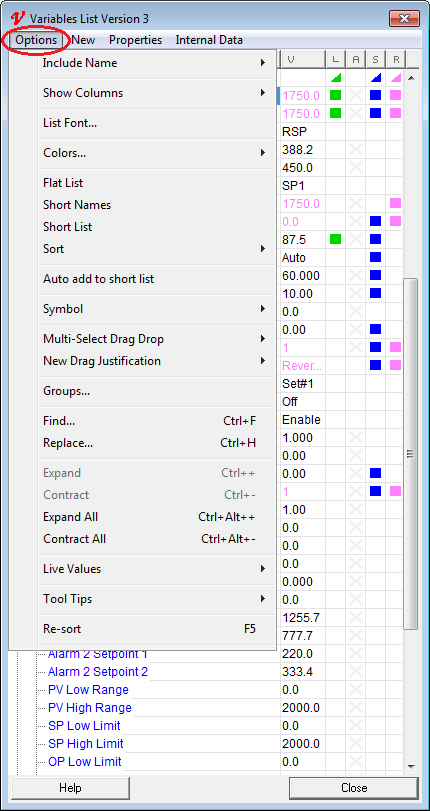
Include Name
This menu item has a sub-menu, which allows the selection of Instrument Name, Parameter Name or both to be included when the parameter(s) or variable(s) are dragged out onto the GDW.
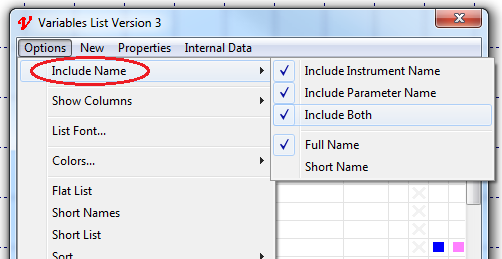
Each parameter (or variable) has both a Full Name and a Short Name which are defined on the Name tab of the Properties box.
Use these to select which name is included when the parameter(s) or variable(s) are dragged out onto the GDW.
Show Columns
This menu item has a sub-menu, which allows the selection of which columns to show in the Variables List.

V=Value, L=Logging, A=Alarm, S=Short List, R=Read Only.
List Font
Allows the selection of the font to be used in the Variables List and in the Parameter List at Runtime.
This can also be set in File->Preferences - Settings.
Changing other fonts within SpecView.
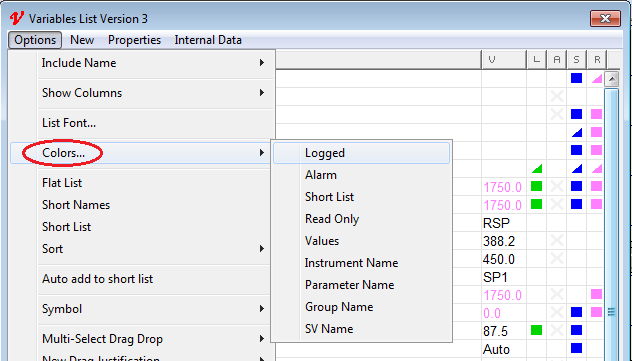
Colors
Allows the selection of the colors to be used in the Variables List and in the Parameter List at Runtime:
Flat List
This sorts the Variables List by parameter name which makes it easy to drag out all of the parameters of the same type from each of the Instrument Views.
Short Names
Allows the use of Short Names (instead of Full Names) within the Variables List.
Short List
Displays an abbreviated list of the important parameters within an Instrument View.
Sort
Specifies the sort order:
